有時候產品的內部結構說明很難解釋,想要使用影片說明又礙於一些製作的困擾
因為最近AI影片的能力大幅提升,所以我們就試著運用AI來做出一些過去不容易做到的說明影片
這次我們想要做內褲底部三層布料的說明,其實說難也不難就是希望將內褲底部紫色部分的三層布料有爆炸圖的成果,成品如下
我使用的工具就是nanobanana pro及kling,用nanobanana產生出圖片,在運用首尾楨的方式去kling產生出影片,另外我產影片及一些圖片的prompt都是用口語跟chatgpt說請他幫我生可以給AI的prompt,畢竟AI才最了解AI
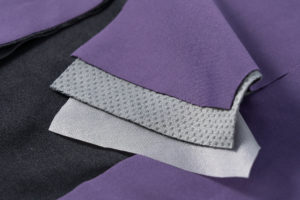
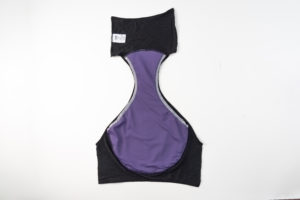
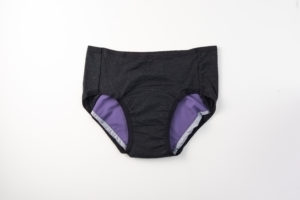
我原始的素材有這些,簡單講就是內褲商品平拍、剪開的內褲平拍、布料圖片
工作流程是先產圖再生影片
一、產生需要的圖
- 先用內褲平拍請nano banana產生內褲3D圖
- 再用剪開的產品圖產生斜視鏡頭平放的圖
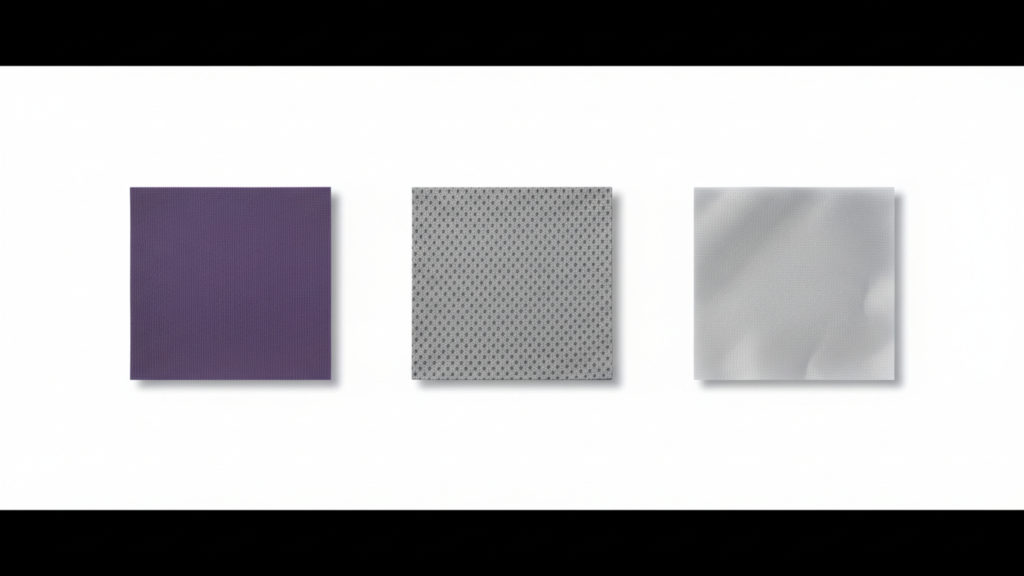
- 第三步是關鍵一步,使用布料的圖片產生三層布料的分開的圖
- 再用前面第二步剪開斜視加上第三步的三片布料分開圖產生爆炸圖
第三步是最關鍵的,因為一開始沒有先把三層布料分開時想要直接產生三片布料浮在褲子上面怎麼樣都失敗,最後想說先把她分開再產應該會好很多
如果沒有先把材料分開就會產生這種鬼樣子,以及其他各種奇奇怪怪的鬼樣子

分開的prompt如下,不過這也是我跟chatgpt說我要把圖片中的三片布料分開產她幫我生的
Use the provided reference image (three-layer fabric close-up) to generate a clean studio product visual. Create three separate square fabric swatches (same size, perfect squares), each representing one layer from the reference: Top swatch: the purple fabric layer texture Middle swatch: the gray textured layer Bottom swatch: the white membrane layer texture Arrange the three square swatches side-by-side horizontally with equal spacing on a pure white background. Make the swatches look photorealistic like real fabric samples: clean cut edges, slight thickness, subtle natural shadows under each square, sharp focus, high detail, accurate colors and textures matching the reference. No text, no labels, no icons, no borders, no extra objects. High resolution, product photography lighting, minimal and clean composition.
二、做影片
做影片比較簡單其實都是運用首尾禎來產,只要圖片產好了運用首尾禎就比較不會跑掉,也算滿好掌控的,prompt的部分都是請chatgpt產,因為這樣才能產生出最精準的prompt也更詳細
- 3D圖到剪開平放
- 剪開瓶放浮出三層布料
最後就是不斷地抽卡微調了,例如我們防水布是很薄的但常常產出的圖就是感覺很厚就必須要不斷跟他說要呈現有點透明輕薄的感覺
最後說一下,google 的flow真的滿好用的她可以增進很多效率,不只可以素材上傳一次就好以後要用到就去素材庫選,如果是已經生出來的圖要再從此圖改可以直接放入prompt,所以大推要用flow來產生
以上是製作這說明小影片的詳細說明,如果有想交流的都歡迎與我們一起交流,一起探索各種AI的可能
